Cities are getting smarter, and so are the homes within them. Smart city lighting, those adaptive LED streetlights that dim at midnight or brighten when pedestrians approach, isn’t just urban infrastructure anymore. It’s a blueprint for how homeowners can rethink outdoor security, energy bills, and even curb appeal. The same sensors, wireless controls, and automation logic that municipalities use to cut energy costs by 50% or more can now fit in a standard porch fixture. Whether you’re retrofitting a front walkway or wiring a new patio, understanding how urban lighting systems work gives you a serious advantage in designing home automation that’s practical, not gimmicky.
Table of Contents
ToggleKey Takeaways
- Smart city lighting principles—motion sensors, LED efficiency, and adaptive brightness—can reduce residential outdoor energy costs by 90% when combined with motion activation and dimming schedules.
- Zigbee and Z-Wave mesh networks are more reliable for outdoor smart lighting than Wi-Fi, as they reduce home network congestion while extending range across multiple fixtures.
- IP65-rated fixtures with 25,000–50,000 hour LED lifespans minimize maintenance while motion-activated pathway lighting deters intruders and enhances security through layered automation.
- DIY smart city lighting projects like motion-activated pathways and dimmable porch fixtures don’t require permits in most jurisdictions and replicate municipal energy-saving strategies at the residential level.
- Warm white color temperatures (2700–3000K) near entryways and cool white (4000–5000K) along pathways improve both comfort and visibility while reducing blue light exposure aligned with circadian rhythms.
- Geofencing and scheduling automation can eliminate manual switches entirely, triggering exterior lights based on smartphone proximity or time-of-day patterns that balance security and energy efficiency.
What Is Smart City Lighting and Why Should Homeowners Care?
Smart city lighting refers to networked LED fixtures equipped with sensors, wireless communication, and centralized control software. These systems adjust brightness based on real-time conditions, dimming when streets are empty, brightening during events, and reporting maintenance needs before bulbs fail.
For homeowners, the appeal is simple: lower energy consumption, reduced maintenance, and improved safety. Where a traditional 100W incandescent bulb costs roughly $12 per year to run at typical usage rates, a comparable LED fixture drops that to about $2. Add motion sensors and scheduling, and annual costs shrink further.
Beyond savings, smart lighting improves security. Automated outdoor lights that respond to motion or time-of-day patterns make homes less predictable to intruders. The same principle cities use to reduce crime in parks and parking structures applies to your driveway or backyard deck.
Homeowners also benefit from the interoperability that smart city projects have normalized. Zigbee, Z-Wave, and Wi-Fi protocols, once fragmented, are now standard in consumer products, making it easier to build systems that talk to each other without proprietary hubs or subscriptions.
Key Technologies Behind Smart City Lighting Systems
At the core of every smart city lighting system are three technologies: LED fixtures, sensors, and wireless mesh networks.
LEDs deliver 80–100 lumens per watt compared to 15–20 for incandescents. They also last 25,000–50,000 hours, cutting replacement cycles from months to years. In urban deployments, this means fewer bucket truck visits and lower labor costs. At home, it means you’re not climbing a ladder every season.
Sensors provide the intelligence. Passive infrared (PIR) sensors detect motion within a 20–40 foot range and trigger lights instantly. Photocells measure ambient light and prevent fixtures from running during daylight. Advanced systems integrate microwave radar or ultrasonic sensors for greater accuracy in weather or around corners.
Wireless mesh networks let fixtures communicate without hardwired control cables. Zigbee and Z-Wave operate on low-power radio frequencies, forming self-healing networks where each device relays signals to the next. This is why cities can control thousands of streetlights from a single dashboard, and why you can control a dozen outdoor fixtures from a smartphone app without trenching conduit across your yard.
Many municipalities now deploy systems with adaptive brightness and traffic monitoring, using sensors that adjust output based on pedestrian and vehicle flow. Homeowners can replicate this with dimmable LED fixtures and occupancy sensors that scale light levels to activity.
How Smart City Lighting Principles Apply to Your Home
Energy Efficiency and Cost Savings
Smart city projects prioritize return on investment, and the same math works at home. Replacing five 60W incandescent outdoor fixtures with 9W LEDs saves roughly 255W per hour. Over 5 hours per night, that’s 1.275 kWh daily, or about 465 kWh annually, around $56 per year at $0.12/kWh.
Adding motion sensors extends savings further. Instead of running dusk-to-dawn, lights activate only when needed. A motion-activated fixture might run 30 minutes per night instead of 5 hours, cutting energy use by 90%.
Dimming capability, common in modern LED exterior home lighting, adds another layer. A fixture running at 30% brightness during low-activity hours uses a fraction of full-power consumption while maintaining a security presence.
Scheduling via smart home hubs or built-in timers aligns lighting with actual use. Program porch lights to full brightness from 6–10 p.m., dim to 20% until midnight, then off until motion is detected. This mirrors the adaptive logic cities use to balance visibility and efficiency.
Adaptive Lighting for Enhanced Comfort and Security
Adaptive lighting adjusts color temperature and intensity based on time, activity, or environmental conditions. Cities use this to improve driver alertness at intersections and pedestrian comfort in parks. At home, the same principles enhance livability.
Color temperature matters more than most DIYers realize. Warm white (2700–3000K) feels inviting near entryways and patios, while cool white (4000–5000K) improves visibility along driveways and pathways. Some systems mimic circadian rhythms, shifting warmer at night to reduce blue light exposure, a feature borrowed from IoT-enabled urban lighting that prioritizes public health.
Motion-activated zones create layered security. A PIR sensor at the driveway triggers pathway lights in sequence, illuminating routes to the front door. This deters intruders while guiding guests safely. Pair this with smart cameras or doorbell integrations for a cohesive system.
Homeowners can also use geofencing, another smart city staple, to trigger lights when a smartphone enters a defined perimeter. Arrive home after dark, and exterior lights activate automatically, no fumbling for switches or apps.
DIY Smart Lighting Projects Inspired by Urban Design
Translating municipal lighting strategies into DIY projects is more accessible than it sounds. Here are three approaches that don’t require an electrician’s license.
1. Motion-Activated Pathway Lighting
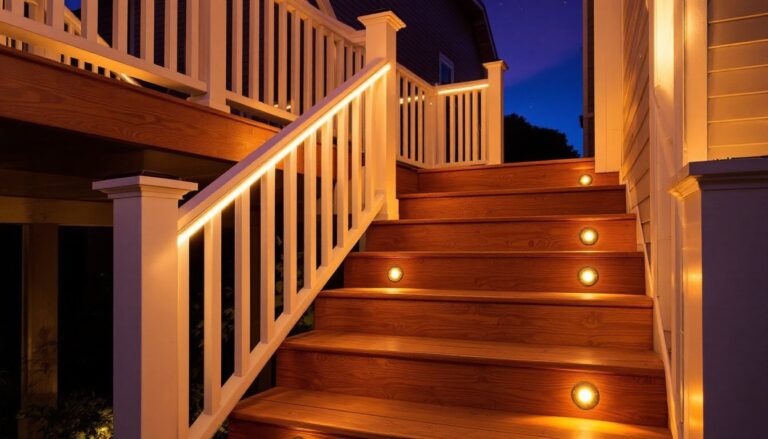
Cities use sequential lighting to guide pedestrians through parks. Replicate this along walkways or deck stairs with low-voltage LED strip lights and PIR sensors.
- Materials: 12V LED strip (IP65 rated for outdoor use), 12V power supply, PIR sensor module, 16-gauge low-voltage wire, wire nuts, mounting clips.
- Tools: Wire strippers, screwdriver, drill, voltage tester.
- Run low-voltage wire from the power supply to sensor locations, typically at pathway entry points. Connect LED strips in parallel to maintain consistent brightness.
- Mount sensors 3–4 feet above ground, angled downward to cover the pathway width (usually 3–4 feet).
- Adjust sensor sensitivity and duration settings, most modules allow 10 seconds to 10 minutes of on-time after detecting motion.
Safety note: Even low-voltage systems require weatherproof connections. Use silicone-filled wire nuts or heat-shrink solder connections, and ensure the power supply is rated for outdoor use or installed in a weatherproof enclosure.
2. Dimmable Smart Porch Fixtures
Swap existing porch lights for smart LED fixtures with integrated dimming and scheduling. This mirrors how cities reduce light pollution and energy waste during low-traffic hours.
- Choose fixtures compatible with your smart home ecosystem (Zigbee, Z-Wave, or Wi-Fi). Verify compatibility with existing dimmer switches if you’re keeping them.
- Turn off power at the breaker. Remove the old fixture, disconnect wiring, and confirm wire gauge (typically 14 AWG for 15-amp circuits).
- Install the new fixture per manufacturer instructions. Most smart fixtures require a neutral wire, if your junction box lacks one, you’ll need to run new wire or choose a fixture that doesn’t require neutral.
- Configure scheduling and dimming curves in the companion app. Set full brightness during evening hours, 30% from 11 p.m. to sunrise, and motion-triggered activation overnight.
3. Solar-Powered Accent Lighting with Smart Controls
Urban planners increasingly use solar-powered fixtures in parks and pedestrian zones. Homeowners can deploy these for garden beds, fence lines, or mailbox areas without trenching.
- Modern solar LED fixtures with built-in batteries and photocells require no wiring. Place them where they’ll receive 4–6 hours of direct sunlight daily.
- Upgrade basic solar lights by adding aftermarket wireless controllers. Some third-party modules replace standard photocells with Zigbee or Wi-Fi controls, allowing remote scheduling and dimming.
- For larger installations, consider centralized solar panels (50–100W) with a charge controller and 12V battery bank feeding multiple fixtures. This provides consistent performance even during cloudy periods.
Choosing the Right Smart Lighting Products for Your Home
Not all smart lighting products are equal, and urban infrastructure reveals what works under stress.
Protocol matters. Zigbee and Z-Wave create mesh networks that extend range and don’t rely on Wi-Fi bandwidth. Wi-Fi fixtures are simpler to set up but can congest home networks if you’re running a dozen devices. If you already use a hub (SmartThings, Hubitat, Home Assistant), stick with Zigbee or Z-Wave for outdoor lighting.
IP ratings indicate weather resistance. Look for IP65 or higher for fixtures exposed to rain and dust. IP65 is dust-tight and withstands water jets: IP67 handles temporary immersion. Coastal areas benefit from IP67 or IP68 due to salt spray.
Lumen output and beam angle determine coverage. A 60W incandescent equivalent is roughly 800 lumens. For pathway lighting, 200–400 lumens per fixture is sufficient. Floodlights for driveways or backyards need 1,000–2,000 lumens with a 120° beam angle to minimize dark spots.
Color rendering index (CRI) affects how accurately colors appear. Urban lighting often uses CRI 70–80 for efficiency, but homeowners should target CRI 80+ for entryways and patios where you want plantings, finishes, and guests to look natural.
Power supply and wiring can’t be ignored. Line-voltage fixtures (120V) require junction boxes and GFCI protection per NEC Article 210.8. Low-voltage systems (12V or 24V) need transformers sized to total wattage plus 20% overhead. If you’re running more than 100 feet of wire, voltage drop becomes an issue, use 12 AWG instead of 14 AWG or install multiple transformers.
Integration and automation features vary widely. Some fixtures support adaptive lighting features that shift color temperature throughout the evening. Others offer grouping, so all backyard lights respond to a single command. Check whether the product requires a subscription for full functionality, many don’t, but some cloud-dependent systems do.
Permit requirements rarely apply to low-voltage landscape lighting or fixture replacements. But, adding new line-voltage circuits or modifying exterior wiring may require permits depending on jurisdiction. When in doubt, check with your local building department before running new cable or installing subpanels.